The problem affecting network connectivity for Macs with the Malwarebytes misconfiguration has been resolved. We apologize for any inconvenience this may have caused you. If you have any questions or continue to experience issues, please contact your support team.
----------------------------------
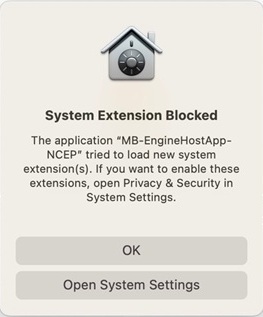
We have noticed that macOS computers running Malwarebytes and with the "MB-EngineHost App-NCEP" filter enabled are failing to access any Wi-Fi or wired networks. If you are prompted by your Mac to enable that system extension, please click OK to close the prompt. Please see the prompt/pop-up below.
If you have already enabled the extension/filter, you can disable it to regain network connectivity by following these steps:
From the Apple menu, open System Settings -> Network -> Filters, then choose “Disable” under Status for MB-EngineHostApp_NCEP.
We are investigating this further and will provide an update as soon as the issue has been resolved. We apologize for any inconvenience this may cause and thank you for your patience. If you have any questions, please contact your support team.