Generative AI for Teaching Excellence
This page offers curated resources to help faculty integrate generative AI into their courses effectively. With tools and guidance tailored to the Columbia Business School (CBS) community, it provides a foundation for exploration, application, and innovation, evolving alongside advancements in AI and the needs of CBS educators.
Contribute to Our Resources
If you have a resource you would like to suggest, especially content created by the CBS community, please email [email protected].
Generative AI Tools Available at CBS
The Columbia Business School (CBS) follows the recommendations and policies set forth by Columbia University (CU) regarding all educational technology tools, including Generative AI tools. This page aims to help faculty identify appropriate Generative AI tools that are available for use. Before use or implementation, please familiarize yourself with Columbia’s Generative AI Policy. It is important to note that the technology is rapidly evolving, and policies are subject to change. Information may be updated regularly to reflect the latest developments and changes.
Last updated on July 8, 2026.
AI Toolkit
Use Case: A secure, customizable AI platform for teaching, learning and administrative tasks
Description: AI Toolkit (formerly CHAT) is Columbia University’s secure AI platform, designed to give users flexibility when using generative AI. It provides access to multiple leading large language models in a secure environment for each user, and can support a variety of academic and administrative needs. AI Toolkit can be used in various language tasks, such as writing emails, summarizing information, translating languages, brainstorming ideas, and engaging in conversation.
Features
- Columbia UNI Authentication: Access is restricted to the Columbia community through secure UNI login.
- Enhanced Security and Privacy: All chats occur in a CU-hosted environment.
- Pay-Per-Chat Model: Usage is billed per interaction rather than a flat subscription.
- No Training on Conversations: Chats are not used to train any LLMs.
- Access to Multiple LLMs: Includes the latest OpenAI models, with the ability to add models from other providers (e.g., Anthropic Claude, Google Gemini) as CU expands agreements.
- Custom Agent Creation: Users can build and deploy personal agents for tailored use cases within the CU environment.
- No Image Generation: This deployment does not support image creation capabilities.
Access: All students, staff, full-time and adjunct faculty
Cost: Daily limit during the pilot phase, paid for by the Dean's Office. This may change as we gather real-time data to finalize pricing.
Google Gemini and Notebook LM
Google Gemini and Notebook LM is now available to all Columbia faculty, staff and students as part of your Google Apps. Please login through Lionmail to access. Here is a screenshot of what it will look like: 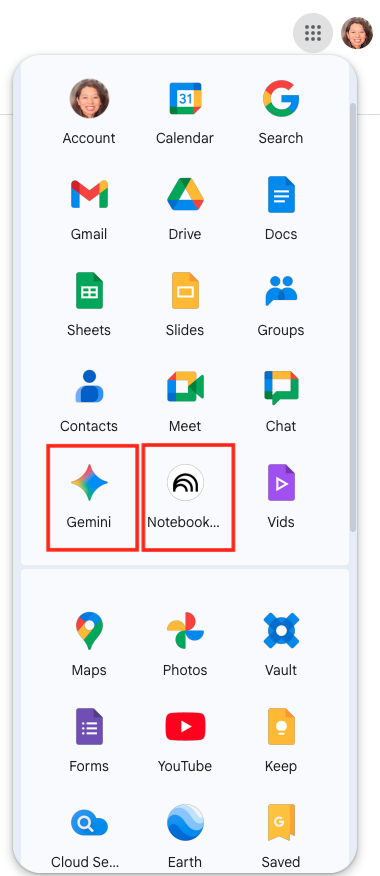
Google Gemini
Use Case: A multimodal generative AI tool for teaching, learning and administrative tasks
Description: Google Gemini is now available to the Columbia University community. This service provides access to Google’s most advanced AI models in a secure, education-focused environment. Gemini supports multimodal capabilities, working with text, images, and code, so you can create, analyze, and organize content for teaching, learning, and administrative work in one place.
Features:
- Columbia UNI authentication within a managed Google Workspace environment
- Works with text, images, and code in the same session
- Real time web search integration through Google Search
- Secure and privacy protected environment approved for Columbia use
Access: Available to all Columbia faculty, staff and students through their Columbia Lionmail account
Cost: Included at no additional cost through Columbia's Google Workspace for Education license
Notebook LM
Use Case: A generative AI tool for organizing and summarizing your own materials
Description: NotebookLM allows Columbia faculty, staff, and students to upload course readings, lecture notes, or other materials to generate summaries, outlines, and insights grounded in their own content. It supports course preparation, learning, and information organization in a secure academic environment.
Features:
- Columbia UNI authentication under Google Workspace for Education
- Upload and summarize your own materials
- Citation aware responses grounded in your sources
- Secure and privacy protected environment approved for Columbia use
Access: Available to Columbia faculty, staff, and students through their Columbia Google account.
Cost: Included at no additional cost through Columbia’s Google Workspace for Education license.
ChatGPT EDU Enterprise
Use Case: The best option for research
Features:
- Columbia UNI authentication
- OpenAI interface
- Enhanced security and privacy for the OpenAI platform
- Fixed monthly price for unlimited chats
- Does not train OpenAI LLM
Access: Full-time faculty and staff who require its use for work purposes. Not available to adjuncts, other part-time employees, students, or faculty/staff who wish to use it for personal purposes
Cost: $25/month (paid by chartstring)
Request access for the educational ChatGPT license from CUIT*.
* If you do already have a paid ChatGPT license through another mechanism, you will need first to cancel that account (login to your existing OpenAI account, navigate to the subscription management section, and follow the prompts to cancel) before you fill out the form above to make sure that you avoid any duplicate charges. (Note: If you wish to retain any data or configurations in your independent account, please follow the data export and import guidelines provided by OpenAI. If you need help, please contact FacSup.)
CBS-AI
Use Case: CBS-AI is a custom platform developed by Columbia Business School to provide secure, course-linked access to generative AI tools like ChatGPT and the OpenAI API. Integrated with UNI authentication and linked to specific courses, it allows faculty to manage usage and align AI activities with course objectives. CBS-AI is used across a range of classes to help students explore model behavior, generate and critique outputs, and experiment with features like the Playground or fine tuning. The tool supports both instructional goals and real-world skill development in an evolving AI landscape.
Features:
- Columbia UNI authentication
- OpenAI interface
- All features of the latest OpenAI chatbot
- Access to the OpenAI API Playground
- Access to API keys
- Must be linked to a course
Contact: Samberg at [email protected] or fill out this form: CBS AI
All Day TA
Use Case: An AI Teaching Assistant students can chat with in the Canvas course to help them understand the concepts covered in class and in the course materials, and to quickly find find information in the course/syllabus. Professor receives weekly summaries of the student questions, highlighting common topics and areas of confusion, and full chat history.
Features:
- Uses only your course materials
- Easy to customize system prompts to tailor the output if desired
- Intelligent Quiz generates quiz questions from the course content
- Does not train any LLMs
Contact: Samberg at [email protected]
CAiSEY
Use Case: A practice playground for class discussion. Students engage with your material before class in a real-time voice or text conversation — they have to defend their reasoning, not just summarize. They walk away with personalized coaching, and you get the full transcript, so you can see exactly who came prepared and where the thinking is thin.
Features:
- Powered by OpenAI's realtime model
- Uses admin-uploaded course materials
- Customizable instructions to tailor the output
- Does not train any LLMs
Contact: Samberg at [email protected]
Free non-CU Tools
Chatbots: ChatGPT (OpenAI), Claude (Anthropic), Gemini (Google), Copilot (Microsoft), Perplexity
Image generation: Adobe Firefly, Microsoft Designer
Please check the vendor’s website for updated features and sign-up options.
Please be sure to to change your settings so that you do not train the LLMS on your inputs. Follow these directions to Keep Your Data Private in Generative AI Tools (LionMail login required).
Custom Use
All new educational technology tools at CBS, including AI tools, are required to undergo a review by Samberg, ITG, and the Dean’s office. This ensures that we make fiscally responsible decisions around educational technology that are pedagogically sound, secure, accessible, scalable, and have ample staff and documentation support.
Submit a request through the EdTech Innovation RFP.
AI Policies
Before using or implementing AI tools in your course, please familiarize yourself with Columbia’s Generative AI Policy. It is important to note that the technology is rapidly evolving, and policies are subject to change. Information may be updated regularly to reflect the latest developments and changes.
Columbia University Generative AI Policy
Learn about Columbia University's Generative AI policy, which provides a framework for ethical and responsible AI use in teaching, research, and administration.
CBS Students Generative AI Policy
Explore CBS's Generative AI Policy, which outlines guidelines and expectations for the ethical use of AI tools in academic work.
CBS Honor Code
Review CBS's Academic Integrity Policy, which highlights expectations for honesty and ethical conduct in academic endeavors.
CBS Faculty Guide to Generative AI Integration Checklist
Discover actionable steps in the CBS Faculty Guide to Generative AI Integration Checklist.
Course Design Resources
Syllabus Requirements
CBS faculty must acknowledge generative AI tools and outline expectations in the syllabus, including learning goals and whether such tools are allowed for assignments.
Suggested Syllabus Language:
- If you want students to limit their use of generative AI tools,
- Students in this course may only use Generative AI tools, such as ChatGPT, for idea generation and must include a citation describing any usage. Using these tools to generate responses to assignments violates CBS's Honor Code, and I will report suspected instances of plagiarism. Please contact me if you have any questions about this policy.
- If you will encourage students to use generative AI tools,
- You may use Generative AI tools, such as ChatGPT, for your work in this course, but only in the ways I have specified in the assignments. When you use any of these tools, you must include a citation describing how you used them to generate your response to the assignment. Please contact me if you have any questions about this policy before submitting.
- Sample citation format: "Description of chat" prompt. Name of generative AI tool, Company, Date of chat, URL.
- Using this format, one citation might look like this: "Examples of harm reduction initiatives" prompt. ChatGPT, OpenAI, 4 Mar. 2023
Resource Library
|
|
|
|
|
|